The power of modern language models isn't just in what they say, it's in how they understand. With the release of Gemma 3 12B Instruct, Google has made high-performance, open-weight vision-enabled LLMs accessible to anyone with a decent GPU.
In this article, I'll walk you through an experiment where I used Gemma to classify images of messy vs. clean rooms: zero fine-tuning, completely offline, and improved performance just by changing a few words in the prompt.
1. What Is Gemma 3 12B Instruct?
Gemma 3 12B Instruct is part of Google's newly released Gemma family: a series of open-weight, vision-enabled, instruction-tuned language models designed to be efficient, accessible, and safe.
The "12B" stands for 12 billion parameters which are the internal values that the model learns during training. These parameters allow the model to generate human-like responses, follow instructions, perform reasoning tasks, and more.
The Instruct variant of Gemma is fine-tuned specifically to follow natural language prompts, making it ideal for tasks like Q&A, summarization, and task execution, without needing any additional training. It's built to understand what you're asking and respond accordingly.
One of Gemma's biggest strengths? It's lightweight and designed to run on consumer-grade GPUs. You don't need a data center to use it. Models like Gemma 3 12B Instruct can run locally and offline, which is a game-changer for privacy-conscious developers and rapid experimentation.
Link to the original announcement for more details: Introducing Gemma 3
2. The Use Case: Classifying Room Images with Just a Prompt
The goal of this experiment was simple: Can a language model, not specifically trained for image classification, determine whether a room is messy or clean just by looking at a picture?
To test this, I used the Messy vs. Clean Room dataset on Kaggle. This dataset contains labeled images of bedrooms and other spaces, each tagged as either "clean" or "messy." It's typically used to train computer vision models, but I wanted to see how far we could go using only prompting and a general-purpose LLM.
Instead of building or training a specialized vision model, I simply passed each image to Gemma 3 12B Instruct, and gave it a basic task:
Classify the image as 'clean' or 'messy'. Reply only with 'clean' or 'messy'.
No fine-tuning. No additional data. Just a prompt and a powerful model running locally.
3. Experimenting with Gemma Using LM Studio
To run Gemma 3 12B Instruct locally, I used LM Studio:
A free, cross-platform app for running open-source LLMs locallySupports GGUF models via the llama.cpp backend (efficient CPU/GPU inference)Offers both a chat interface and a local API server for programmatic interaction
I initially used the built-in chat interface (screenshot below) to prompt Gemma with images and collect responses. This made it easy to test variations of the task manually before moving to automated experiments via Python.
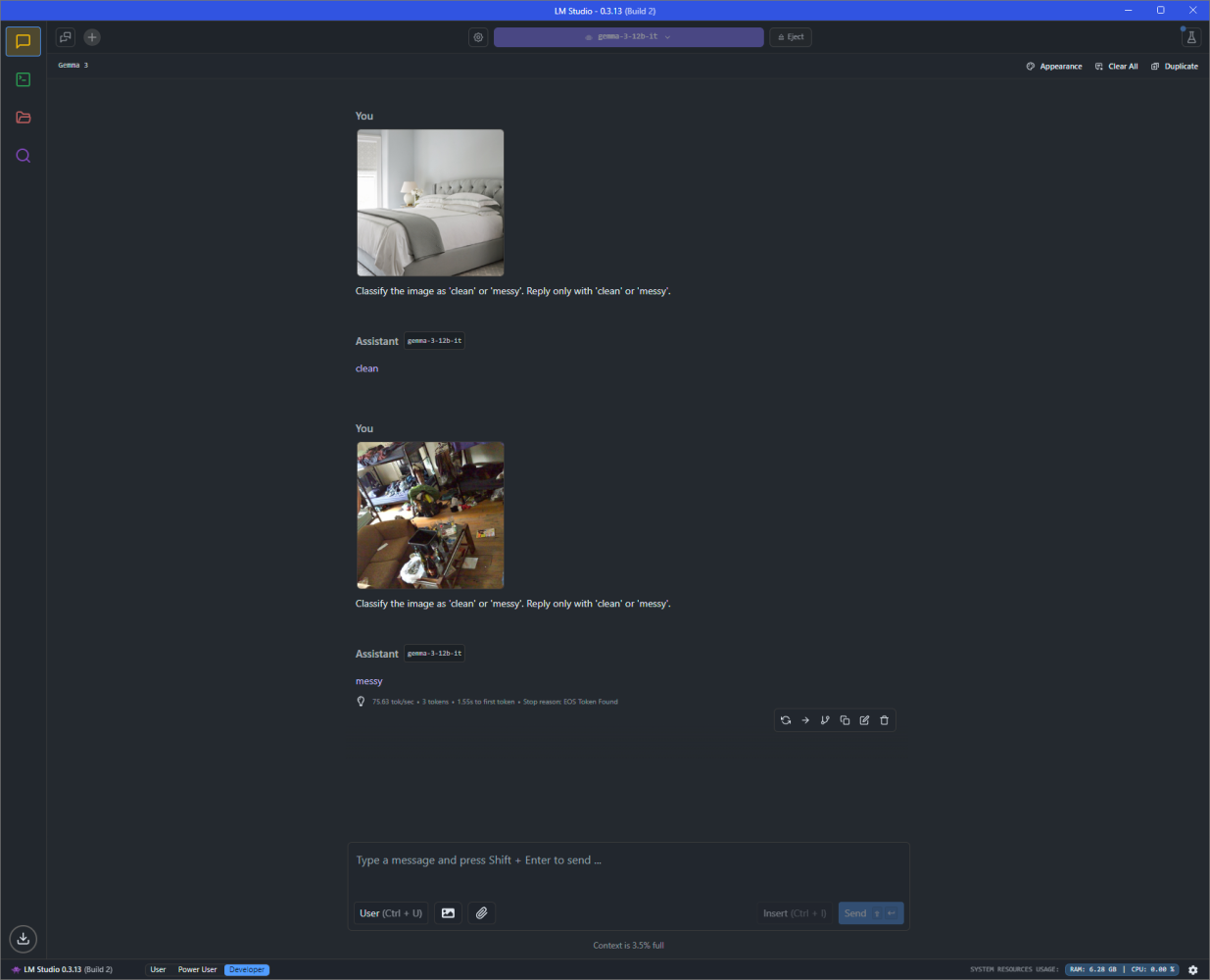
LM Studio also allows you to run a local HTTP server, enabling integration with custom scripts. This is how I connected Python to automate the image classification process and evaluate performance at scale.
You can download LM Studio here
Tutorial: Mastering LM-Studio: Unleashing LLMs locally
4. My Setup: Running Gemma Locally
One of the most exciting parts of this project is that everything ran offline, on my own machine: no cloud GPUs, no API keys, and no internet required.
My GPU is an NVIDIA RTX 4070 Ti Super with 16 GB of VRAM, enough to comfortably run Gemma 3 12B Instruct in GGUF format (Q4_K_M quantized).
Quantization is a technique that reduces the size of a model by lowering the precision of its internal weights (e.g., from 16-bit floats to 4-bit integers). This drastically cuts down memory requirements while keeping performance mostly intact. Thanks to quantization, we are able to run many parameter-heavy models locally.
Why GPU & VRAM Matter:
GPU Acceleration drastically speeds up inference compared to CPU-only setups, making interactions with the model feel real-time.VRAM: While your system's RAM handles general-purpose tasks, VRAM (Video RAM) is dedicated memory on the GPU. It's where the model is actually loaded during inference. If the model doesn't fit in VRAM, it has to spill over to system RAM or disk, which slows things down dramatically, or makes it impossible to run altogether.
5. Initial Results: What Happened Out of the Box?
With the setup ready and the dataset in place, I ran the first round of image classification using Gemma 3 12B Instruct. I passed one image at a time through LM Studio, each paired with the following prompt:
Classify the image as 'clean' or 'messy'. Reply only with 'clean' or 'messy'.
No context. No examples. Just the image and the instruction.
The Results:
Precision (clean): 1.00 - Every time it said "clean," it was correctRecall (clean): 0.79 - It missed some clean roomsPrecision (messy): 0.83 - Some clean rooms were wrongly called messyRecall (messy): 1.00 - It caught all the messy rooms
My Intuition:
Apparently, Gemma is a bit of a neat freak: it was quick to call out mess, even if the room just looked slightly untidy. That behavior makes sense though: the model hasn't been trained for this specific visual judgment. The fact that it performed this well, with no training and just a prompt, was already impressive.
6. The Results Were Good, but Not Good Enough
The initial performance was solid: perfect precision for clean rooms, and perfect recall for messy ones. But still, something felt off.
Gemma was missing some clean rooms and occasionally flagging them as messy. For a human, these rooms clearly weren't disasters, but to Gemma, a slightly rumpled bed might've been enough to trigger the "messy" label.
I wanted to improve the results. A few years ago, this is what that would've involved:
Collecting more labeled training dataWriting a custom training pipelineFine-tuning the model with careful hyperparameter tuningMonitoring loss curves and overfitting risksRunning experiments for hours or daysDeploying and re-evaluating over and over again
Even small improvements required serious time, compute, and expertise.
But in this case, I didn't touch the model at all. I just rewrote the prompt.
7. The Fix? Just a Better Prompt
Instead of retraining or changing anything under the hood, I decided to change the instruction I gave the model. Here's what I started with:
Classify the image as 'clean' or 'messy'. Reply only with 'clean' or 'messy'.
It was short, clear, and objective. But since Gemma behaved like a neat-freak, I added just a bit of guidance:
Classify the image as 'clean' or 'messy'. Be less neat and more tolerant. Do not classify the room as messy unless it is truly messy. Reply only with 'clean' or 'messy'.
That small change made a big difference.
New Results, Perfect Accuracy:
Precision (clean): 1.00Recall (clean): 1.00Precision (messy): 1.00Recall (messy): 1.00
The model no longer misjudged clean rooms, and it still confidently identified messy ones. All it needed was a clearer set of expectations: no code, no data, no retraining.
Disclaimer: Keep in mind that this is a curated Kaggle dataset, where the images can clearly be classified into the 2 chosen classes. One should not expect this high of a performance on other datasets.
8. Why This Is Incredible
This wasn't just a fun test, it's a glimpse into the future of how we build with AI.
Here's why this matters:
No training required: Gemma wasn't fine-tuned or retrained. It understood the task through instructions alone.Performance improved with a few words: A simple prompt tweak led to perfect accuracy.30 minutes, start to finish: From setup to final result, the entire process took less than half an hour.General-purpose model: Gemma isn't built just for image tasks, it can answer questions, write code, and more.Runs offline on mainstream hardware: All of this happened locally, on a consumer GPU, with no cloud or internet dependency.
The Big Shift:
What used to take days of engineering and training can now be achieved by writing a better sentence. This is a shift in how we solve problems with AI.
9. Other Use Cases: One Model, Many Applications
While this experiment focused on classifying messy vs. clean rooms, the real power of Gemma 3 12B Instruct lies in its flexibility. With the ability to understand both language and images, it can be applied across a variety of practical scenarios, no retraining required.
Real-World Use Cases:
Warehouse Monitoring: Identify stock levels, misplaced items, or empty shelves using visual input from camera feeds.Telco Field Interventions: Perform post-task verification by asking the model: "Is this site cleaned and closed properly?" based on a single image.Healthcare & Workplace Safety: Assist in monitoring hospital rooms or workspaces to ensure they meet cleanliness and safety standards.
All of these tasks can be handled using the same model, the same hardware, and just the right prompt.
Try It Yourself
Everything in this project, from the image classification logic to the prompt formatting and evaluation, was built using simple Python scripts, made possible by LM Studio's local API.
The code was generated with the help of AI, and I've made it available here:
View the code on GitHub: here
Whether you want to experiment with your own images, tweak the prompts, or adapt it for one of the use cases above, the project is fully open and easy to build on.